

Get complete visibility of every project site.
Switch to ZEP360 and discover a unified way to manage your business.
Book a Demo
A good quotation format wins the job before the first site visit. A messy one starts an argument about scope, tax and payment that you then spend months settling. If you quote solar, electrical, HVAC, interior, civil, painting or pest control work, the layout you send decides whether the client reads a clear offer or a pile of numbers.
This guide explains what a quotation format is, what every quote must contain, and how a quote differs from an estimate or a proforma invoice. It walks through a filled example with GST, tax notes for India, Australia, New Zealand and the UAE, and the mistakes that cost contractors money. It also links to eight free quotation templates built for specific trades, each in Excel or Word, so you can start with a free quotation format that already fits your work.
What is a quotation format?
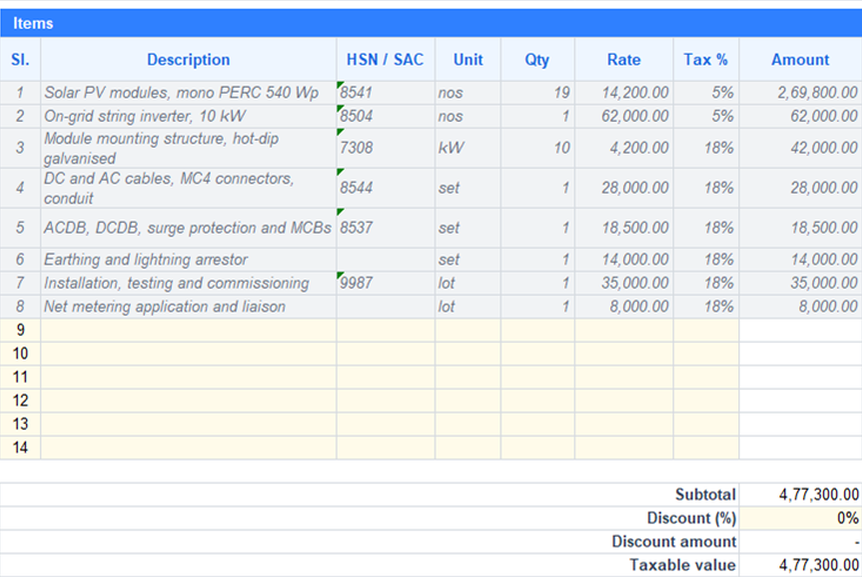 A quotation format is a standard layout for pricing a job before the client commits. It works as a written offer, and it lists your company details, the client, the individual items, the tax, the total and the terms. It also states how long the price stays valid. Because the layout is fixed, every quote your team sends is complete, easy to compare and easy to check.
Most small firms copy the last job's file and change a few cells, which is a quick way to build a standard quote that nobody has checked. That works until two people quote two clients in two different layouts, and one of them forgets the validity date or the exclusions. A shared quote template fixes this. Every estimator fills in the same blocks in the same order, and the client always knows where to find the price, the payment terms and the scope.
A business quotation is also a commercial promise, and it belongs in your own records as much as the client's. Once the client accepts it, the quote usually becomes the reference for the work order, the invoice and any dispute about what was included. That is why the format matters more than it first appears.
Quotation vs estimate vs proforma invoice
People use these words loosely, and the confusion costs money. A client who reads a rough estimate as a firm price will hold you to it. A client who receives a proforma invoice may think the work is already confirmed. A quotation form that states its purpose clearly avoids both mistakes. Here is how the six documents differ.
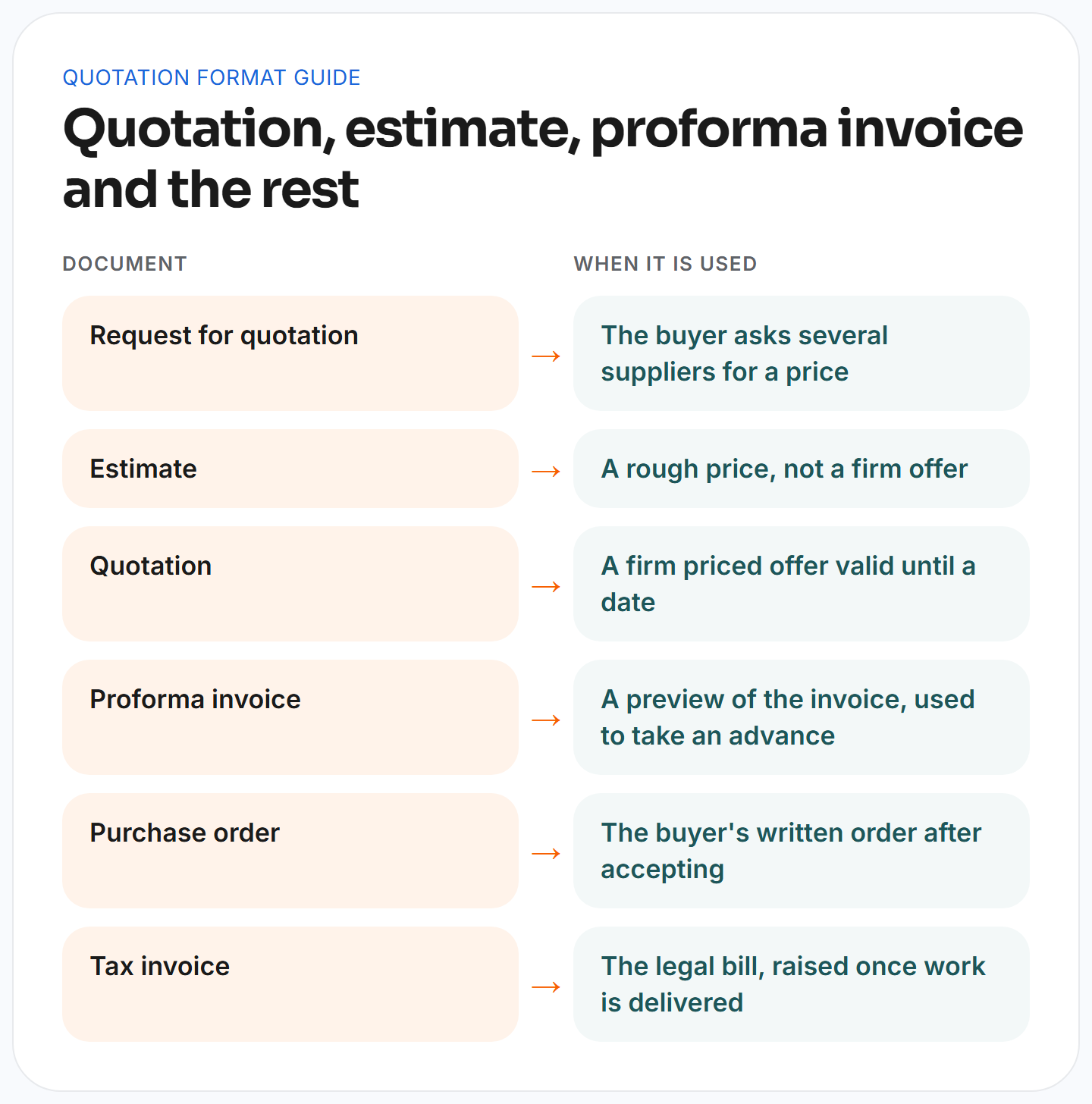
- The request for quotation (RFQ) is what a buyer sends to several suppliers, so your quotation is the reply to it.
- An estimate is a rough price, often given before a site visit, and the final cost can move away from it. A cost estimate is also the internal calculation behind your price.
- A quotation is a firm offer at a stated price for a defined scope, and it stays valid until a stated date.
- A proforma invoice previews the final bill, and contractors use it to collect an advance before they start.
- The buyer sends a purchase order after accepting your quote, and it confirms the order in writing.
- The tax invoice is the legal bill that you raise when work is delivered or a milestone is complete.
A simple decision rule helps. Send an estimate when the scope is still unclear, and send a quotation once you have measured the job and can stand behind the number. Send a proforma invoice when you need money in before you buy materials, and send the tax invoice only when the work or the milestone is done.
What a quotation must include
Every quote needs the same essential elements and essential details. Missing one is how disputes start, so use this list as a checklist before any quotation leaves your office.
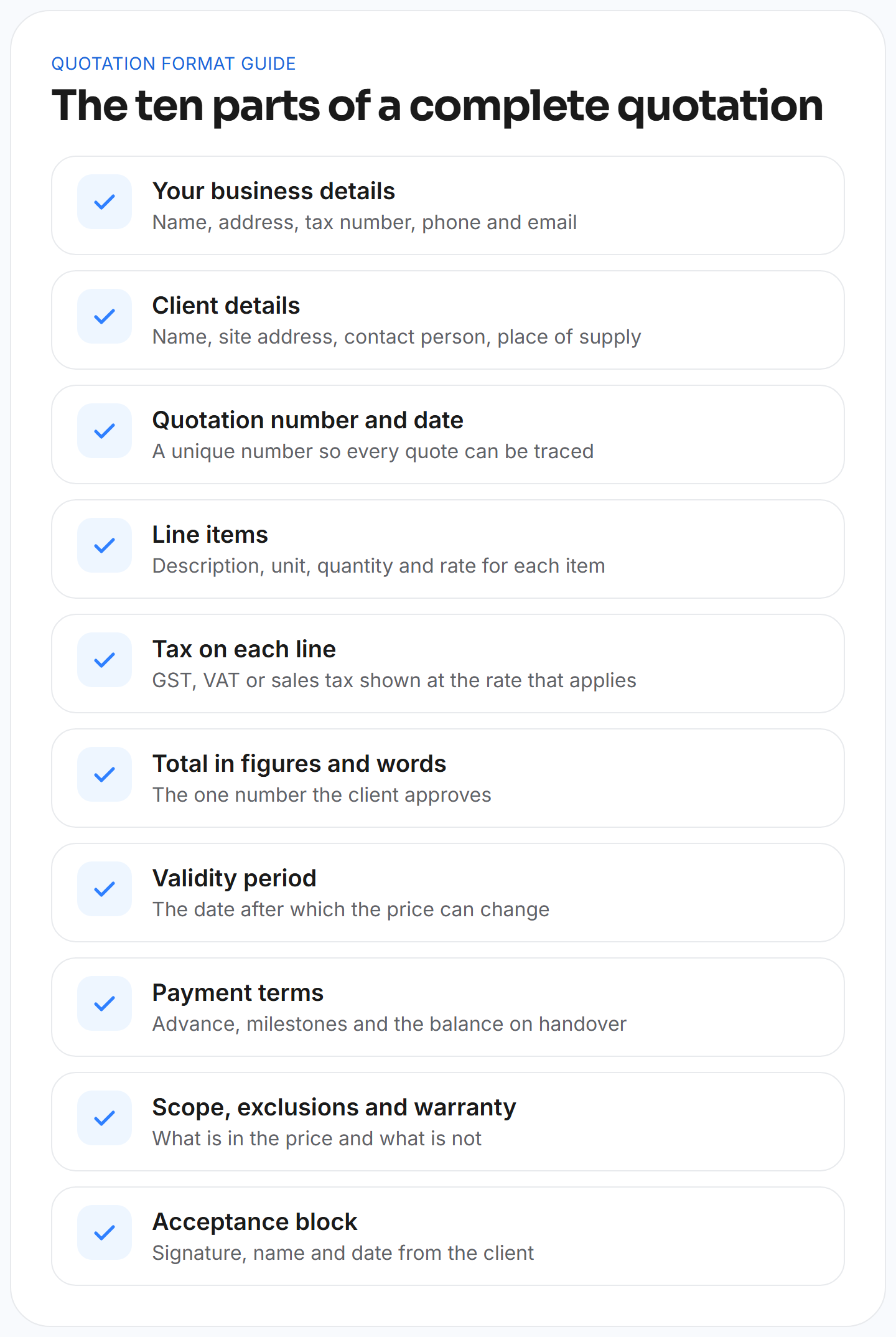
- Your company details: Put your registered name, company address, phone number, email address and tax registration number at the top. In India that is your GSTIN, in Australia your ABN, in New Zealand your GST number and in the UAE your tax registration number.
- Client details: Write the client's name, the site address, a named contact person and the place of supply. If the billing address differs from the site address, show both.
- Quote number and issue date: A unique quotation number such as QT-2026-001 lets you trace every quote, find it a year later and refer to it in the work order. If you revise a quote, keep the number and add a revision suffix such as R1, so the history stays readable.
- Line items: Each of the individual items carries a short description, a unit of measurement, a quantity and a rate. One row per product, service or phase keeps the quote readable and makes it easy to compare against your own cost estimate.
- Tax on each line: Different items can carry different rates, so show the applicable taxes on every line instead of one rate on the whole quote. Mixed rates then add up correctly.
- The total, in figures and in words: The total is the one number the client approves. Writing it in words as well removes doubt about a misplaced comma.
- Validity period: State the date after which your price can change. Material prices, especially copper, cable and modules, move with the market, so an open-ended quote puts all of that risk on you.
- Payment terms: Spell out the advance, the milestones and the balance on handover. If you charge for variations, say so here.
- Scope, exclusions and warranty: List what the price includes and what it leaves out. A clear scope of work also protects you when a client later claims that an extra was included.
- Acceptance block: Leave space for the client's signature, name and date, so the accepted quote is a record you can point to.
A filled quotation example with GST
Blank forms teach very little, so here is a filled one. This quotation sample is for supplying and installing two split air conditioners. The figures and the 18% rate are examples only, so check the current rate for your own item in the official GST rate schedule before you quote.
In the sample, the item is a 1.5 ton split AC, supplied and installed. The quantity is 2 nos at a rate of 46,000, which gives an amount of 92,000. GST at 18% adds 16,560, so the line total is 108,560.
The calculation follows three steps. First, quantity times rate gives the subtotal of 92,000. Second, subtotal times the tax rate gives 16,560 in GST. Third, adding the two gives a quote total of 108,560, which is 54,280 per unit including tax. The quote then states the total in words as one lakh eight thousand five hundred and sixty rupees.
The same quote also needs the lines around the table. It shows a validity line such as This quotation is valid for 15 days from the date above. It lists the payment schedule, for example 50% advance and 50% on commissioning. It names the exclusions, such as electrical points and civil work, and it gives the warranty and the first service visit. Without those lines the table is only a price list.
Free quotation templates by trade
A generic form cannot calculate a solar payback or a painting area, which is why we built a free quotation template for each trade. Every file is a professional quotation template with sample rows, drop-downs and formulas, and every file works in Excel or Word without macros. The picture below shows which one fits which business. The paragraphs after it describe each template and the sample figures built into it, and you should replace those with your own costs.
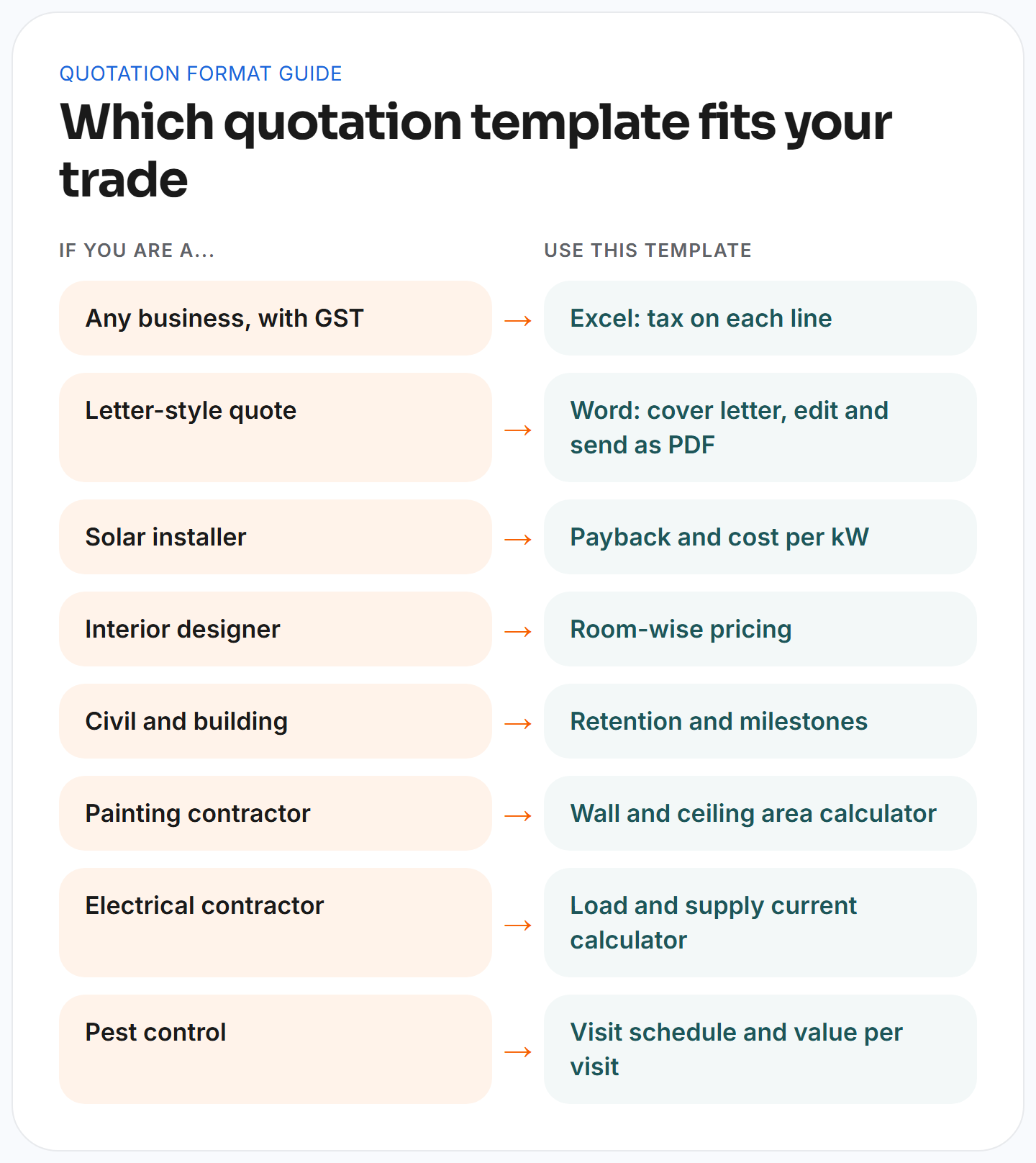
- Quotation format in Excel with GST: The Excel quotation template suits any business that needs tax on each line. It has fields for HSN or SAC codes, a tax rate per line and automatic totals, so a quote with mixed rates adds up without a calculator. It is the best starting point if you quote different kinds of work.
- Quotation format in Word, letter style: The Word quotation template is a ready letter with line items, tax, a payment schedule, bank details and terms. It suits clients who expect a covering letter, and you can edit it, add your logo and send it as a PDF.
- Solar quotation format: The solar quotation format lists modules, an inverter, a mounting structure and installation. The sample file shows a cost of 52,008 per kW and a simple payback of 4.5 years. A real quote uses the client's tariff and consumption, and it describes the payback as an estimate and never as a guarantee.
- Interior quotation format: The interior quotation format prices work room by room and totals each room before adding the rooms into a project total. The materials specification sits beside the price, so the client knows which finish the room rate covers, and payment stages follow the project.
- Construction quotation format: The construction quotation format prices each work item by quantity and rate. It holds back a retention percentage and sets milestones, so each payment ties to a stage of progress, and it adds tax automatically.
- Painting quotation format: The painting quotation format has an area calculator. A room of 16 by 14 feet with a height of 10 feet and 63 sq ft of doors and windows returns a paintable wall area of 537 sq ft, and that area then multiplies by your rate per square foot.
- Electrical quotation format: The electrical quotation format splits materials from labour and adds tax. Its load calculator takes the quantity and watts of each load, applies a demand factor, and estimates the connected load, the demand and the supply current. That lets you check that the client's supply can carry the work before you promise a price.
- Pest control quotation format: The pest control quotation format covers one-time treatments and annual contracts. The sample annual contract is priced at 24,000 across four quarterly visits, which works out to 6,000 per visit, and showing that value helps the client see why a yearly contract beats a one-time job.
Customising a template takes about half an hour and pays back on the first quote. Replace the sample company details with your own, add your logo and set your tax registration number. Change the sample terms to the ones your lawyer or senior partner has approved, and replace the sample rates with your current rates. Then lock the formula cells, save the file as your master and make a fresh copy for every quote, so nobody overwrites the master by accident.
Excel, Word or PDF?
The right file type depends on who edits the quote and who reads it. Excel is best when you calculate, because formulas multiply quantity by rate and add tax for you, and the Excel version also opens in Google Sheets. Word is best when the quote is mostly a letter, with a short price table and a few paragraphs of terms. A Word template also opens in Google Docs for clients and colleagues who do not use MS Word. The PDF format is what you send, because the layout stays fixed on the client's screen, but it is a poor format for editing.
Most contractors end up using two of them. They build the quote in Excel, check the numbers, and export a PDF to send by email or WhatsApp. Whichever you choose, keep one master file per trade, lock the formula cells, and save each sent quote under its quotation number. That habit alone prevents the common error of sending last month's rates.
Quotation letter format: sample wording
Many clients, especially in India, expect a short covering letter with the quotation. A good letter is brief and complete, and it repeats the three things the client must not miss, which are the price, the validity date and the scope. You can copy the wording below and replace the brackets.
Dear [Client name],
Thank you for inviting us to quote for [job description] at [site address]. Please find our quotation [number] attached. The total price is [amount] including [tax name], and the quotation is valid until [date]. The price covers [scope summary] and it does not include [exclusions].We propose to take [advance] on acceptance, [milestone payment] at [stage], and the balance on handover. To accept, please sign the last page and return it to us. Please call me on [phone] if you would like to walk through any line of the quotation.
The Word template is built as a letter, so you can paste this wording above the price table and fill in the brackets.
How to write a quotation for work, step by step
Pricing is the hard part, and a good format only helps once the numbers are right. Follow these steps for any quotation for work, whether it is a repair, an installation or a full project.
- Understand the scope: Visit the site, ask what the client wants and write the scope in plain sentences with all the relevant details. For anything physical, a site survey with measurements and photos turns a guess into a number.
- List every item: Break the job into materials, labour, equipment, transport and any subcontracted work, and use a bill of quantities for larger jobs.
- Price each line from your own costs: Use current supplier rates for materials and your real labour cost per day or per unit, not last year's numbers.
- Add overheads and margin: Overheads cover your office, vehicles and tools, and margin is what the job earns after all costs. Quotes that skip these two lines look cheap and lose money.
- Apply the correct tax to each line: Check the rate for each item, because services and goods can differ.
- Write the terms: Add validity, payment schedule, exclusions, warranty and the way you handle changes.
- Check, number and send: Read the quote as the client would, give it a number and save a copy before sending.
- Follow up: A quote that nobody chases often dies quietly, so plan the follow-up before you send.
A work quotation format is the layout contractors use when the job is mostly labour and materials, such as electrical, plumbing, painting or civil work. Showing labour and materials on separate lines helps the client see what they pay for, and it helps you when a material price rises. If the client asks for a discount, you can adjust the margin line without touching the cost lines.
A service quotation format is different because the price covers a period instead of a single delivery. It states the number of visits, what each visit includes, the response time for breakdowns and the renewal date. If you sell an annual maintenance contract, quote the visit schedule and the value per visit, as the pest control template does, so the client sees what the yearly fee buys. Here is a simple example with made-up figures. A client has 10 air conditioners and wants four preventive visits a year at 3,000 per unit per year. The subtotal is 30,000, GST at 18% adds 5,400, and the yearly total is 35,400. Divided across four visits, that is 8,850 per visit including tax, and the quote should state both the yearly figure and the per-visit figure.
Pricing mistakes hurt more than formatting mistakes, because a well-formatted quote with a bad price still loses money. Three habits keep your numbers honest. First, track what past jobs actually cost, because job costing compares the quoted price with real spend on materials, labour and subcontractors, so your next quote starts from facts. Second, price from current supplier rates and state how long they hold. Third, keep a standard margin target per trade and decide in advance how far you will discount, so a negotiation never turns into guesswork.
Contractors who run EPC projects have one more issue. The price proposal must cover design, procurement and construction, and any gap between the three usually becomes your cost. List each phase as its own block so a change in one does not blur the others.
Tax rules in four countries
Tax rules differ by country, and a quote that ignores them creates problems when you raise the invoice. This section gives the basics, and it is not tax advice, so confirm details with your accountant.
- India: A GST quotation format shows the GSTIN of both parties, the HSN code for goods or the SAC code for services, the tax rate for each line and the place of supply. For a sale inside one state the tax splits into CGST and SGST, and for a sale between states it is charged as IGST. The official GST portal publishes the registration and invoicing rules, and its taxpayer search lets you check a client's GSTIN before you put it on a quote.
- Australia: GST is 10% and a business registered for GST shows its ABN on its documents, which you can confirm on ABN Lookup. A quote is not a tax invoice, so you still raise a proper tax invoice after the work.
- New Zealand: GST is charged at 15% on most goods and services, and the Inland Revenue GST pages explain when a business must register and how to charge GST correctly.
- United Arab Emirates: VAT is 5% and registered businesses show their tax registration number, known as the TRN. The Federal Tax Authority explains the rules on its VAT page.
The words also change by country. Contractors in India usually search for a quotation format, while many in Australia and New Zealand search for a quote template, and the UAE market uses both words. The document is the same, so use the local word in the title and the local currency on every amount. In the UAE that usually means AED, in Australia AUD, in New Zealand NZD and in India INR.
In every country, state whether your prices include or exclude tax, and show the tax as its own line. Clients compare totals, so a quote that hides tax inside the rate invites an argument later.
Payment terms, validity and scope
Payment terms are the part of a quotation that protects your cash flow. A short job can use 50% advance and 50% on completion. A longer job should use milestones tied to progress, such as material delivery, installation and commissioning. Construction contracts often add retention, which is a percentage held back by the client until the defect period ends, and the construction template includes it.
Validity needs the same care. In our sample templates, prices are valid for 15 days for trades where material rates move quickly, such as electrical, solar, painting and pest control, and 30 days for construction. Treat these as starting points and shorten them when your supplier rates are unstable.
On long construction jobs, state whether the price is fixed for the whole contract or whether it can change with the cost of named materials, and say which one applies, because a silent assumption on either side becomes a dispute later. A short validity date also adds gentle urgency, because the client knows the price will not wait.
Most quotation disputes come from the scope, not the price. A client assumes that a line covers something it does not, and you assume the opposite. Two habits prevent most of it. The first is a written exclusions list, which says plainly what is not included, such as electrical points, civil work, permits, scaffolding or removal of old material. The second is a variation clause, which states that any change to the scope will be priced separately and agreed in writing before the work starts. Three sentences cover most of what a contractor needs to protect, and you can adapt them to your own terms.
- This quotation is valid for 15 days from the date above.
- Prices are based on supplier rates on the quotation date and may change if the order is placed after the validity date.
- Any work outside the scope described in this quotation will be quoted separately and carried out only after written approval.
The exclusions list is easier to write when you start from what usually goes wrong in your trade. A solar quote often excludes roof strengthening, approval fees and any structural repair. An electrical quote often excludes chasing and wall restoration, and an air conditioner quote often excludes extra piping beyond the standard length and any new power point.
A painting quote often excludes furniture shifting and repair of dampness, and an interior quote often excludes loose furniture and appliances. A pest control quote often excludes areas that the technician cannot reach, and a construction quote often excludes permits and soil testing. These are typical examples, so adjust them to your own contracts and your local rules.
Five quotation mistakes
These mistakes show up in almost every set of quotes we see, and each one has a simple fix.
- Leaving out the validity date lets an old quote return months later at old rates, so add a date on which the price expires.
- Writing a vague scope invites disputes, so list what is in and what is out, and attach the site survey notes if the job is large.
- Using one tax rate on every item breaks mixed-rate jobs, so set the rate on each line.
- Skipping payment terms delays payment, so write the advance, the milestones and the balance.
- Changing the layout every time confuses clients and staff, so keep one standard format for the whole team.
Sending, following up and tracking wins
A quote does not win the job by arriving. Send it the same day as the site visit, while the client still remembers the conversation. Attach a PDF, put the total and the validity date in the email body, and offer a short call to walk through it. Remember that potential customers often compare three quotes side by side. They look first at the total, then at what the price includes, then at the validity, the warranty and the payment terms. If you can offer two options, such as a standard and an upgraded specification, the client compares your options instead of comparing you with a rival. Keep the options short, with the same scope headings in each, and show the price difference in one line so the client sees exactly what the upgrade buys.
Before you press send, run a short final check.
- Confirm that the client name and site address are right, that every quantity matches the site survey, and that the tax rate on each line is correct.
- Check that the total in words matches the total in figures, that the validity date is in the future and that the payment terms add up to 100%.
- Finally, open the PDF on your phone, because a table that looks fine on a laptop can break on a small screen.
Most clients now read quotes on a phone, so keep the PDF light and make the total easy to find on the first page. Sending it by email and again as a WhatsApp message with the same file works well in markets where clients answer messages faster than email. A typed name and a reply of "accepted" is enough for some small jobs, but larger jobs deserve a signed copy or an e-signature, so you hold a record that shows the date and the version the client approved.
Then plan the follow-up. A reasonable rhythm is a message two or three days later to confirm that the quote arrived, and a second message a few days before the validity date. If the client asks for changes, issue a revised quote with a new version number instead of editing the old file, so you always know which version the client accepted.
You cannot improve what you do not measure, and quoting is easy to count. Keep a simple log of every quote with its number, client, trade, value, date sent and outcome. Then divide the quotes accepted by the quotes sent. If you sent 25 quotes last month and 10 were accepted, your win rate is 40%. Look at the rate in slices instead of one overall figure.
If you win most small quotes and lose most large ones, the problem is probably the follow-up or the scope detail on bigger jobs. If you win almost everything, your prices may be too low. Record the reason every time a client says no, because a handful of repeated reasons tells you what to change.
From quotation to work order
Winning the quote is the start of the job, not the end. Once the client signs, the accepted scope becomes a work order for your team. After the work, a service report records what was done, and the tax invoice follows. If you sell maintenance, the next quote, for the annual contract renewal, should already be on the calendar.
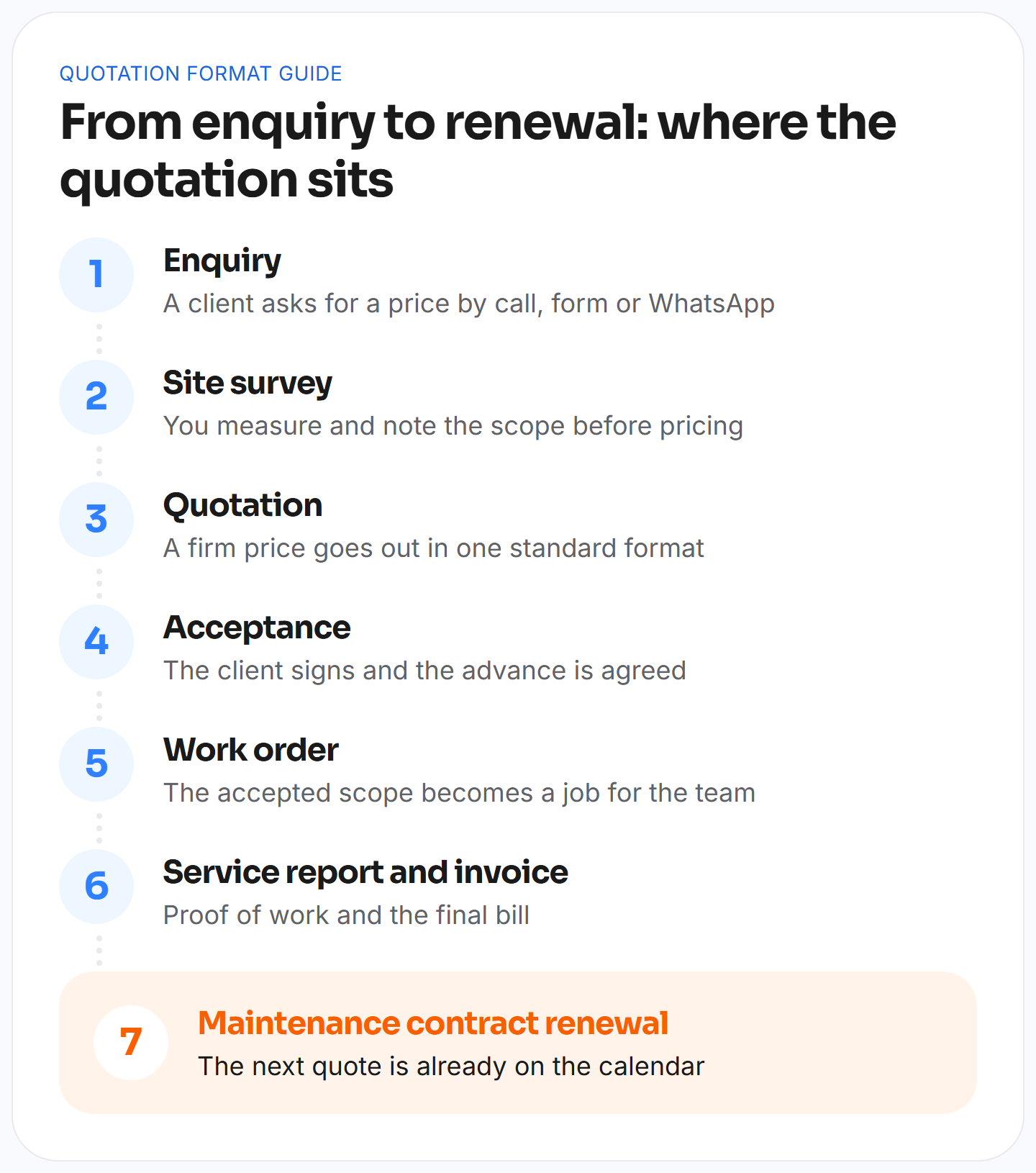 The accepted quote should feed the work order directly, so nobody types the scope again. Our work order format guide shows the fields a work order needs, and the free work order template gives you a ready file. When the quote and the work order match line for line, the invoice at the end almost writes itself. If the client changes the scope after the work starts, record the change as a variation against the original quote number, so the final invoice shows the original price, each approved change and the new total.
Quotation templates or software?
Free quotation templates and free quote templates are a good start. They cost nothing, a new hire can use them on day one, and for a business that sends a few quotes a week they may be all you need. They stop working when quotes pile up. Each quote is typed again into the project, versions live in file names, and the follow-up depends on someone's memory.
That pain is common. A 2021 survey by Xero found that 39% of tradespeople worldwide spend more than 12 hours a week on paperwork, and quoting is a large part of it. If you send many quotes, track follow-ups in a spreadsheet and re-enter approved quotes into a project, it is time to look at software. When you compare options, look for a few specific things. The tool should build quotes from site survey data, keep every version with a status, apply tax per line and carry an accepted quote into the project without retyping. It should also remind you to follow up and track renewals, because repeat service work is often the most profitable work you quote.
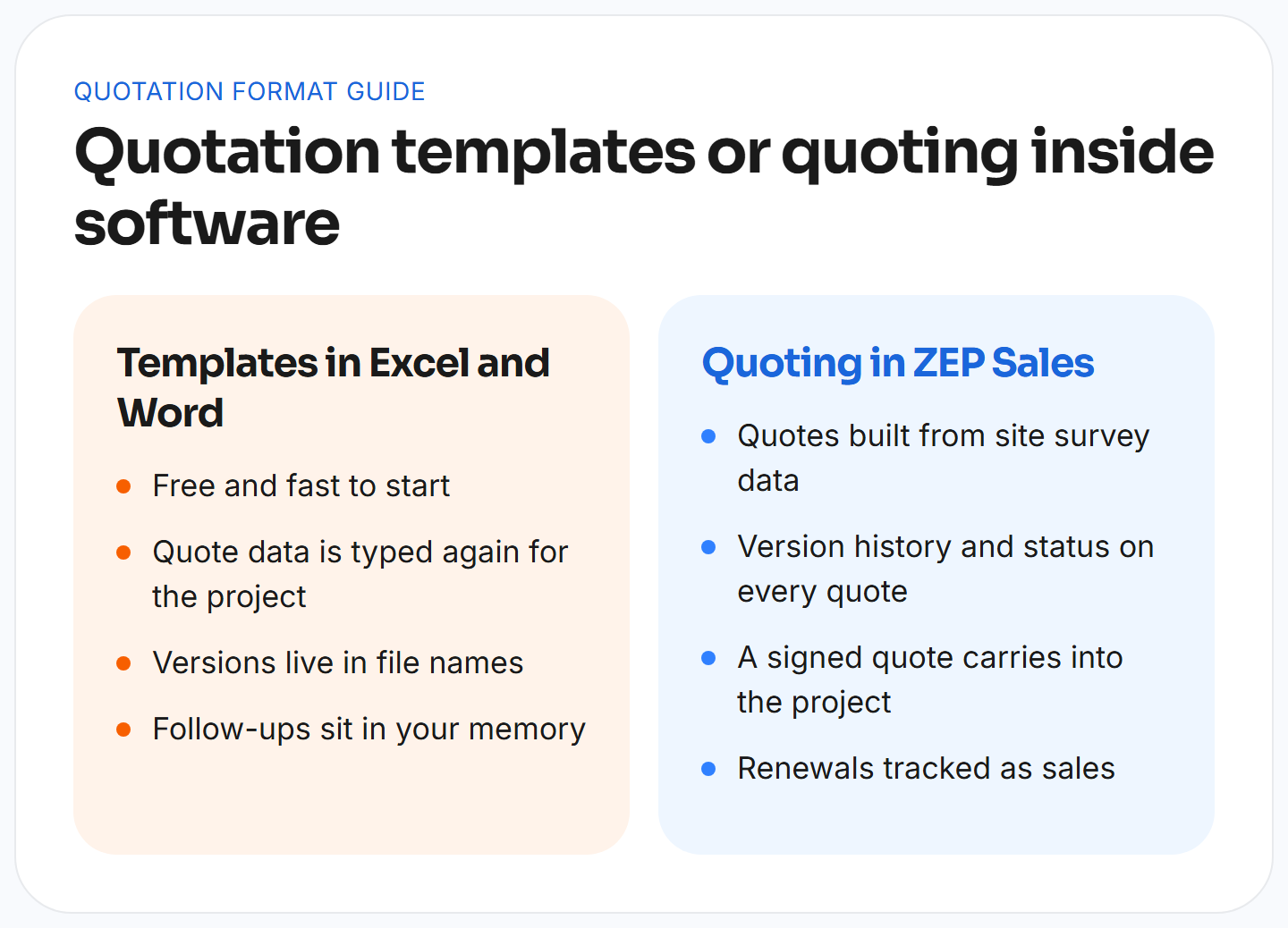 ZEP360 builds software for project-led and service businesses. In ZEP Sales, quotations are built from site survey data, each quote has a version history and a status, and the signed quote carries into the project, along with its bill of quantities. Recurring service enquiries and maintenance contract renewals are tracked as sales, so the next quote is never forgotten. Once a job is won, ZEP Projects takes over the delivery, and Field Service schedules the visits. If you want to see how this would fit your own quoting process, talk to the ZEP360 team.
Frequently Asked Questions
What is the quotation format?
The quotation format is the standard layout for pricing a job. It holds your details, the client's details, a quotation number and date, line items, tax, the total, a validity date, payment terms, exclusions and an acceptance block, so every quote is complete.
Is a quotation format in Excel or Word better?
A quotation format in Excel is better when you need calculations, because it multiplies quantity by rate and adds tax for you. Word is better for letter-style quotes with a short price table. Many contractors build in Excel and send a PDF.
What is a work quotation format?
A work quotation format is the layout for jobs that combine labour and materials, such as electrical, painting or civil work. It shows labour and materials on separate lines, adds tax per line and states the scope, payment terms and validity.
What should a service quotation format include?
A service quotation format should include the number of visits, what each visit covers, the response time for breakdowns, the price per visit or per year, the contract period and the renewal date, along with the usual tax and payment terms.
Is there a free quotation template for contractors?
Yes. ZEP360 offers a free quotation template for solar, interior, construction, painting, electrical and pest control work, plus general Excel and Word versions. Each has sample rows and formulas, and you can edit it for your own business.
How long should a quotation be valid?
There is no fixed rule. Many contractors use 15 days when material prices move quickly and 30 days for larger jobs. Choose a period you can honour, state the expiry date clearly and shorten it when supplier rates are unstable.
Is a quotation legally binding?
It depends on the wording and the country. A quote is generally an offer, and once the client accepts it the terms can form a contract. Write the scope, price and validity clearly, and ask a legal adviser if the job is large.
What is the difference between a quotation and a proforma invoice?
A quotation is an offer to do work at a stated price, sent before the client commits. A proforma invoice previews the final bill and is often used to collect an advance. Only the tax invoice is the final legal bill.
Get complete visibility of every project site.
Switch to ZEP360 and discover a unified way to manage your business.
Book a Demo

