

Get complete visibility of every project site.
Switch to ZEP360 and discover a unified way to manage your business.
Book a Demo
Solar project management software tracks each solar job from the first inquiry to the final handover. It holds the site survey, quote, bill of quantities, material requests, installation tasks, approvals and payments in one place. Good tools also carry the customer into annual maintenance after commissioning. ZEP360 builds solar project management software for exactly this cycle, so this guide draws on questions Indian solar teams ask us.
This guide covers what the software does, the features that matter in India, and 14 tools compared. You'll also find a checklist for choosing one and a 30-day rollout plan. If you only need design software, read our OpenSolar alternatives list first.
What is solar project management software?
Solar project management software plans, tracks and reports on every solar installation a company runs. It replaces the manual work of spreadsheets, chat groups and paper forms that most installers start with. A project manager opens one screen and sees project status for every job, which ones are late and what each has cost so far.
The software covers the full job. A site survey becomes a quote, the quote becomes a project, and the project becomes a service contract. Each handoff keeps the same record, so nobody re-types customer details or measurements.
Solar CRM and solar project management software are two different products. A solar CRM manages the sale. It tracks leads, follow-ups, quotes and the pipeline up to a signed order. Solar project management software manages the delivery. It tracks tasks, materials, crews, approvals and payments after the order is signed.
Small installers shouldn't buy both as separate products. The sales data has to flow into the project without re-entry. Our guide on job management software explains how that handoff works across trades.
Why solar companies need project management
Solar volume across the solar industry in India is rising faster than most teams can add people. The Ministry of New and Renewable Energy reports that India added 44.61 GW of solar capacity in FY 2025-26, nearly double the 23.83 GW of the year before. Cumulative solar capacity reached 150.26 GW on 31 March 2026 (PIB press release, 8 April 2026).
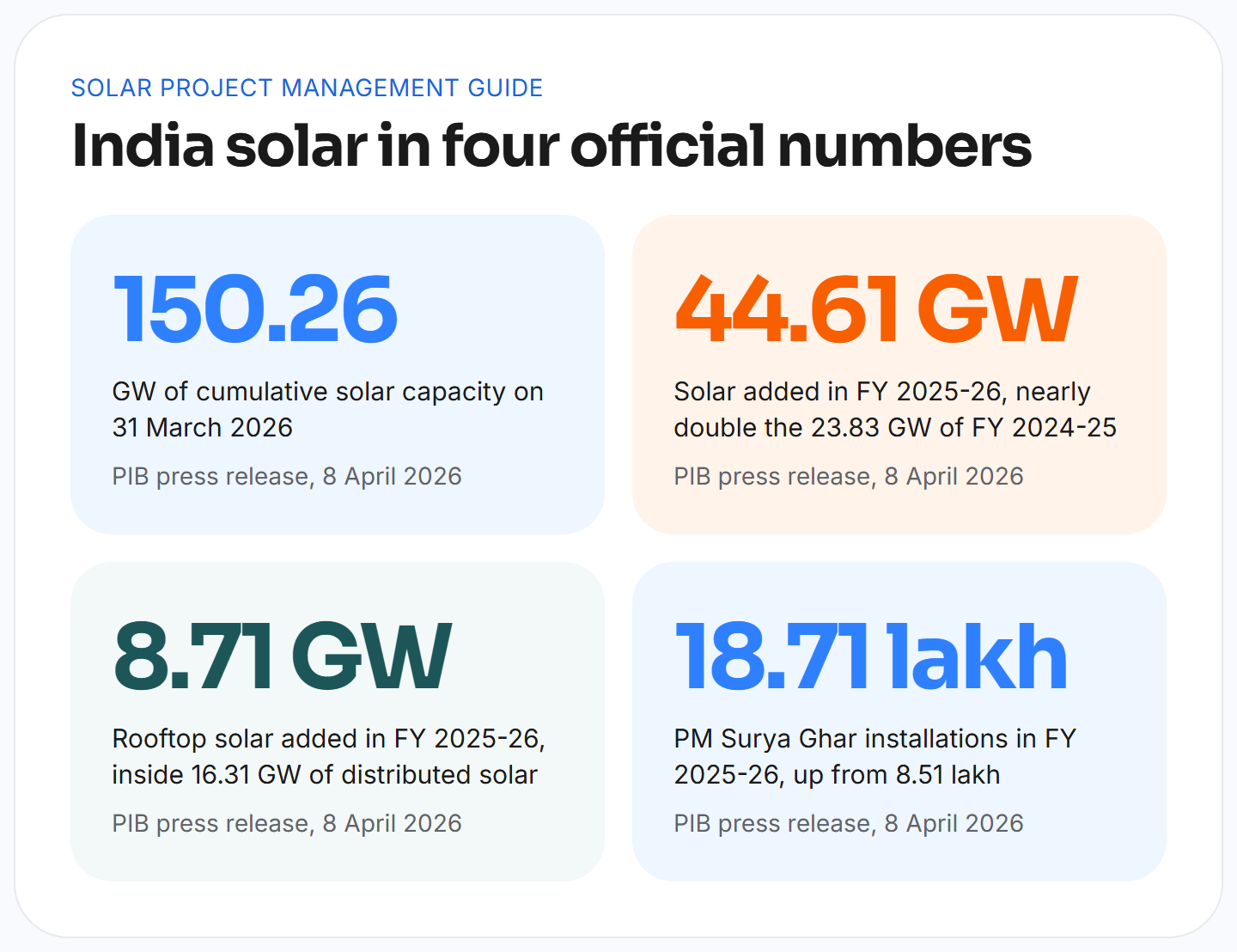 The same release shows where the work sits for small and mid-size firms. Rooftop solar added 8.71 GW in FY 2025-26, and PM Surya Ghar installations rose from 8.51 lakh to 18.71 lakh. Commercial and industrial projects, including captive plants, added about 15 GW, roughly 34% of the year's additions. The release also says GST on renewable energy devices and parts fell from 12% to 5% from 22 September 2025.
Rooftop solar adds volume fast. JMK Research reports that India added about 9.8 GW of rooftop solar from January to September 2026, taking cumulative rooftop capacity to about 33.4 GW (JMK Research, October 2026). Under PM Surya Ghar, pv magazine India reports 34,219 registered vendors, with 29,469 of them active. It also reports that installations rose from 5,038 a day in October 2025 to nearly 16,328 a day in July 2026 (pv magazine India, 4 August 2026).
Six more 2026 reports point the same way.
- Energetica India reported 162.15 GW of installed solar capacity in its first quarter of FY 2026-27 update, including 30.11 GW of grid-connected rooftop systems (Energetica India, 15 July 2026).
- Down To Earth reported that solar installations rose 43% in the first half of 2026 against the same period a year earlier, with rooftop solar adding around 6.4 GW (Down To Earth, 15 July 2026).
- SolarQuarter reported that July 2026 recorded 5.06 lakh rooftop installations under PM Surya Ghar, the highest month since the scheme began (SolarQuarter, 7 August 2026).
- Mercom India reported 14.8 GW of cumulative rooftop capacity commissioned under PM Surya Ghar (Mercom India, 4 August 2026).
- Outlook Business reported the minister saying India is nearing 300 GW of installed non-fossil capacity (Outlook Business, 6 August 2026).
- TaiyangNews reported that India added a record 55.3 GW of non-fossil capacity in FY 2026 (TaiyangNews, 10 April 2026).
Larger projects bring potential issues too, from late permits to missing stock. The pace keeps rising. On 4 November 2026 the Minister said PM Surya Ghar had crossed 65 lakh rooftop installations and that installed solar capacity stood at 172 GW, according to All India Radio. More jobs mean more surveys, more quotes, more material orders and more approvals running at once. A firm that handled a few projects a month by memory can't handle many more the same way. That's the point where project management software stops being optional.
Eight stages of a solar project
Every solar job follows the same arc, even when the paperwork differs by state. Software helps when it mirrors the entire workflow and lets you add your own stages.
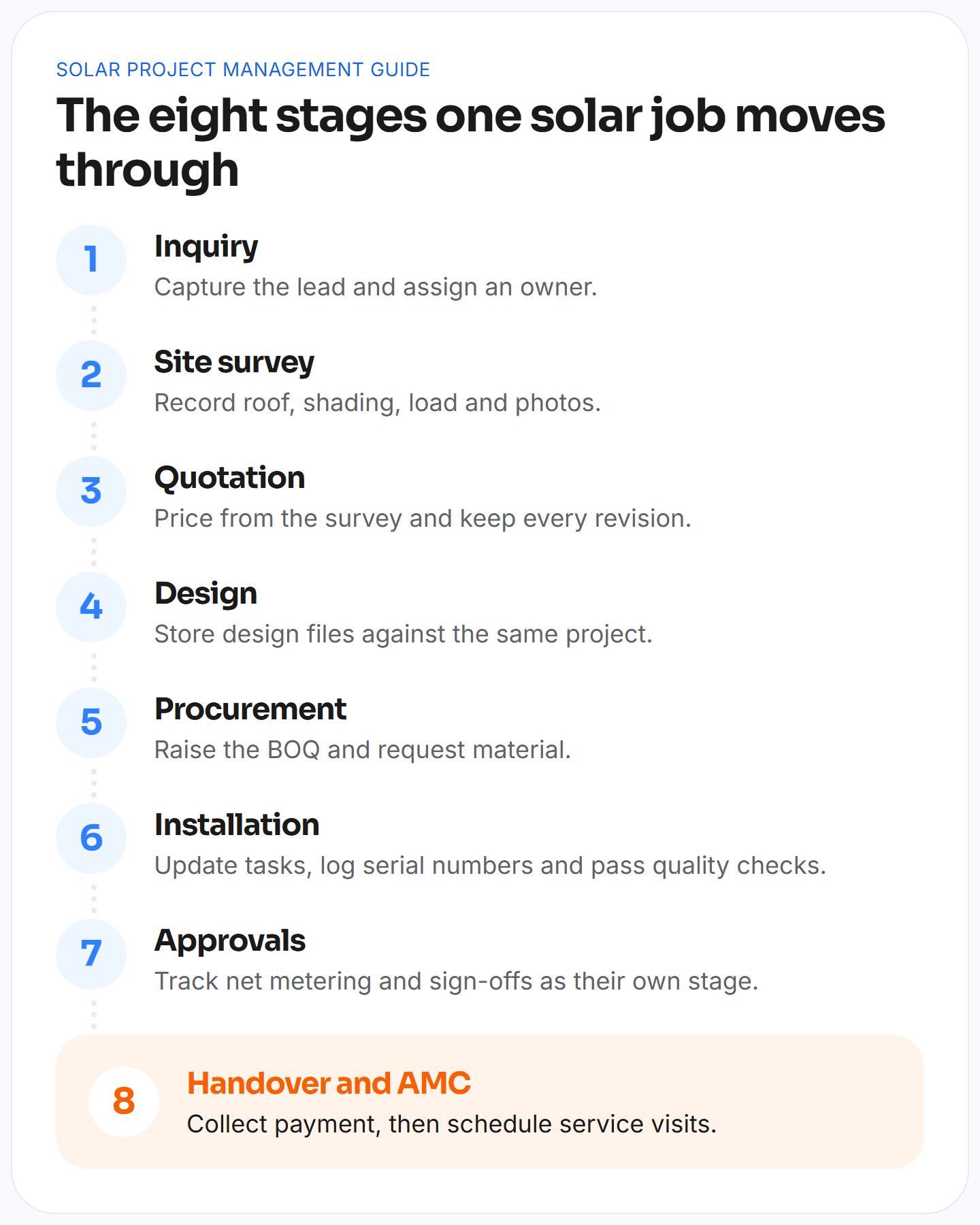 The eight stages are these.
- Inquiry: The lead arrives from the website, WhatsApp, a referral or a field visit, and gets an owner.
- Site survey: The team records roof type, shading, load and structure with photos. Our glossary entry on a site survey lists the fields to capture.
- Quotation: The team prices the job from the survey and revises it as the customer asks for changes.
- Design: The design files are stored against the same project, whichever design tool made them.
- Procurement: The team raises a bill of quantities, requests material and routes orders for approval.
- Installation: Crews update task status, log module and inverter serial numbers and pass a quality checklist.
- Approvals: Net metering, electrical inspectorate clearance and any subsidy sign-off run as tracked steps.
- Handover and AMC: The customer pays the final milestone, and the service visits begin.
Most Indian EPC firms run this arc across a sales team, a store, a design cell and site crews. The software's job is to keep all four groups looking at one record.
Where spreadsheets break
Spreadsheets work for the first few jobs. They fail when two people edit one file or a photo sits in a chat that someone muted. Six failures show up again and again.
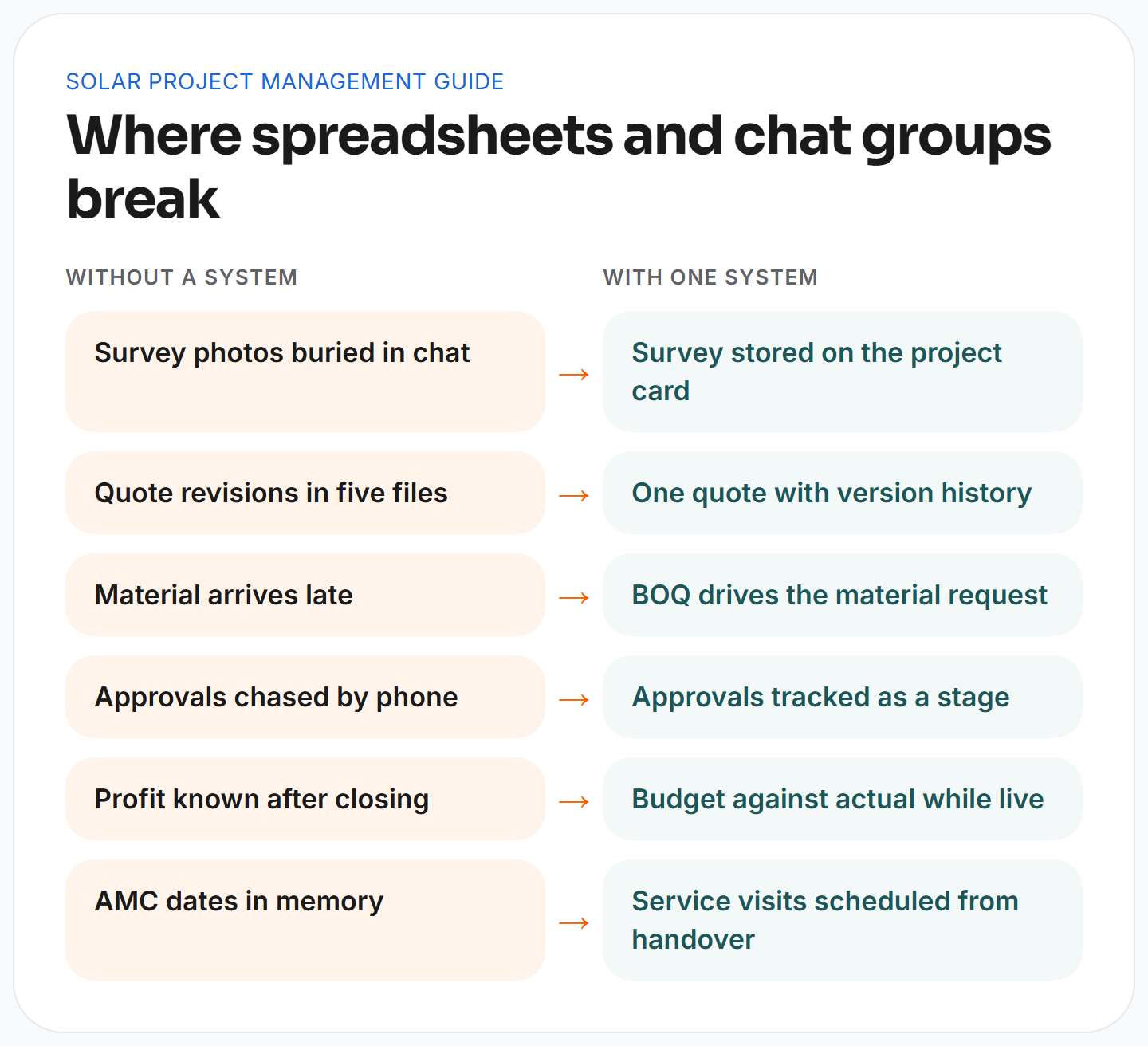 Survey photos get buried in chat, so the designer works from memory. Quote revisions live in five files, so nobody knows which one the customer approved. Material arrives late because the BOQ never reached the store. Approvals get chased by phone. Profit shows up only after the books close, which is too late to fix a loss. AMC renewal dates sit in one person's head.
Each failure has a direct fix in a connected system. The survey sits on the project card. The quote keeps its version history. The BOQ drives the material request, a flow we cover in our guide to purchase order software. Approvals become a stage with an owner. Budget runs against actuals while the job is live, which is the habit behind job costing. Service visits get scheduled from the handover date.
Key features to look for
Vendors list dozens of features. Eight key features decide whether a small Indian solar business gets value, and each one should work end to end in a demo.
- Survey, quote and BOQ on one record: The survey should capture roof, shading, load and structure on a mobile form with geo-tagged photos. The quote should build from that survey data and keep every revision. The BOQ should come from a saved template, so a 5 kW rooftop job doesn't start from a blank sheet. If the tool can't connect these three, your team will keep re-typing.
- Procurement and inventory: Late material stalls every stage after it. Look for a material request raised against the BOQ, approval by the store manager and stock that updates as crews install. Serial number capture on site matters for warranty claims later, because asset management starts with a solar panel or inverter tied to one customer. Tools built for sales or design fall short here.
- Scheduling, tasks and crew updates: Tasks need owners, due dates and dependencies, because panels can't go up before the structure is ready. Crews should update status from a phone. Managers need a view of what's late across all active jobs, not one job at a time. Resource management also means watching resource usage, since one crew can't be on two roofs.
- Approvals, subsidy and DISCOM paperwork: Indian solar jobs depend on approvals that vary by state and utility. Net metering, inspector clearance and subsidy claims need their own tracked steps. Good document management keeps forms, certificates and drawings for each job in one folder. The better tools generate the forms from project data, so the team enters customer and system details once. Ask each vendor to show a net metering job, because most global tools have no concept of it.
- Finance, profit and payments: Look for payment milestones per project, reminders on what the customer owes and a budget against actual cost view. A project that closes on budget on paper but lost money on material wastage is a common surprise. Live cost tracking exposes it early and improves overall efficiency.
The remaining features are mobile access for crews, role-based permissions and reporting. Each deserves a short test.
- Mobile app: Test it with a crew member who has never seen it.
- Permissions: Check that a technician can't see margins or other customers.
- Dashboards: Confirm that the owner can see profit per project in real time without asking accounts.
- AI assistant: Treat it as a way to ask questions of your data. Some tools advertise predictive analytics, so check what each one actually predicts.
After-sales and AMC. A commissioned plant needs service for years. Annual maintenance contracts bring steady revenue, and many installers leave it unmanaged after handover. The software should schedule visits, log service tickets against the project history and alert you before renewals. Our guide to the annual maintenance contract lists the clauses to include.
Types of solar software
Search results for this topic mix four different product types. Mixing them up leads to the wrong purchase.
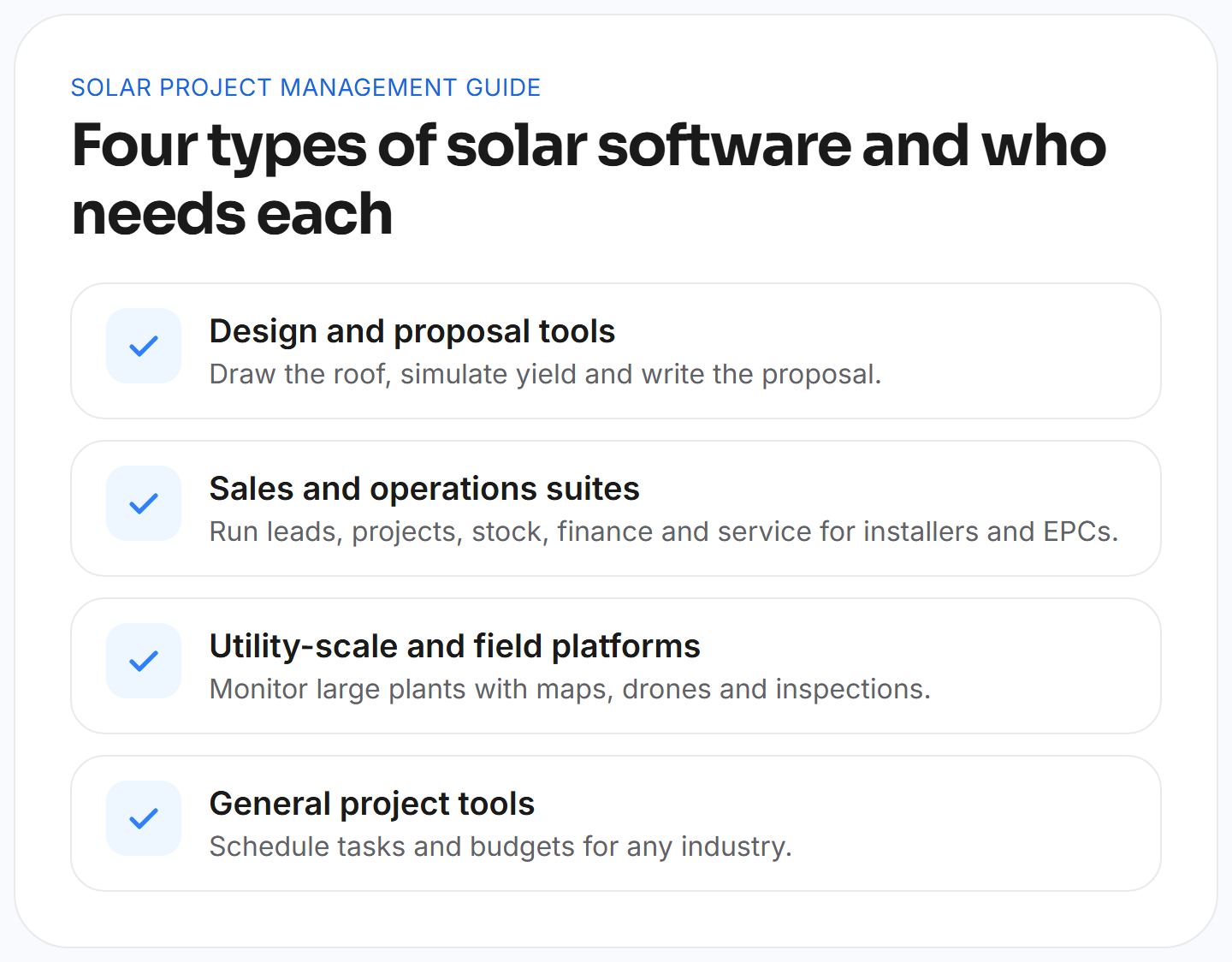 Design and proposal tools handle solar design. They draw the roof, simulate yield and produce the customer proposal. Sales and operations suites run leads, projects, stock, finance and service. Utility-scale and field platforms monitor large construction sites with maps, drones and inspections. General project tools schedule tasks and budgets for any industry.
A small installer usually needs an operations suite plus a design tool. A developer building a large solar power plant needs a utility-scale platform. Decide which one you are before you compare prices.
14 solar tools compared
The tools below come from the top-ranking pages for this keyword and from the vendors' own sites. We read each vendor's public pages in November 2026. Where we say a vendor "says" something, we haven't verified it. Prices are what vendors publish, and a missing price means the vendor publishes none. We list ZEP360 first because we make it, and we tell you where it's weaker.
This list sums up what each vendor's pages show.
- ZEP360 covers solar stages, CRM and quotes, inventory and BOQ, and AMC visits after install, and it publishes no price.
- Solar Ladder says it covers stages, CRM, inventory in its books section and AMC, and it publishes no price.
- SuryaHub covers stages, CRM, purchase orders and stock, and AMC reminders, and it quotes after a demo.
- Sunbase covers stages and CRM with partial AMC support, and its plans start from $59 per user per month.
- OpusFlow covers stages, CRM, quotes, stock and service contracts, at EUR 99 to 119 per user per month.
- SenseHawk covers utility-scale stages, serialized inventory and O&M work, but it has no CRM and no published price.
- Sitemark covers utility-scale construction and O&M work, with no CRM and no published price.
- SiteCapture covers forms, inspections and maintenance work orders, with no CRM, and it charges $320 to $720 per month on annual billing.
- MightyFields covers templates and scheduling for field teams, with no CRM, inventory or published price.
- Celoxis is a general project tool with no solar stages, CRM or inventory, at $10 to $45 per user per month.
- SurgePV covers design and proposals, says it is not a project management product, and charges $1,299 to $1,899 per user per year.
- ARKA 360 covers design with tasks, sells CRM as an add-on and publishes INR plans plus GST.
- Aurora Solar covers design and sales tools with USD pricing and limited project management.
- OpenSolar covers design and sales with workflow stages and a built-in CRM, and its core is free.
Sales and operations suites run the whole business around a solar job. They suit installers and EPC firms that run sales, stores and site crews together.
ZEP360 runs every part of a solar business, from sales to service, on one record. It tracks a solar job through eight configurable stages, from inquiry to handover and AMC. The survey runs as a mobile form shared over WhatsApp, and the quote builds from the survey data. ZEP360 doesn't draw roof layouts or simulate yield, so pair it with a design tool. It publishes no prices. You pick a package and add users.
Solar Ladder says it is built for Indian solar EPCs and that more than 600 companies use it. Its pages list a CRM, tasks and stages, books with inventory and costing, and an O&M section with AMC management. It also offers 3D design and a loan section. It publishes no pricing, and its project management page gives few details on stages.
SuryaHub says it is built in Jaipur for Indian EPCs. Its pages describe a job file that moves from quote to survey to install, purchase orders and stock with serial tracking, GST invoices and AMC reminders. It also describes PM Surya Ghar and DISCOM tracking. It quotes in INR plus 18% GST after a demo. It says it has no native PV design and that a design tool connects through a paid add-on.
Sunbase says it serves solar, roofing and construction contractors. It lists configurable project stages, permits, crews, inspections and finance tools from $59 per user per month. Its terms such as PTO and interconnection are US ones. We found no GST or DISCOM content on the pages we read.
OpusFlow is a European installer ERP that says more than 3,000 installers use it. It combines CRM, quotes, planning, stock, field forms and contracts, with 17 AI agents. It charges EUR 99 per user per month on yearly billing or EUR 119 on monthly billing, with a minimum of 3 users and onboarding from EUR 1,500. We found no India content.
Design and proposal tools draw the system and produce the customer proposal. They don't run your project after the sale.
ARKA 360 says it is built for Indian solar firms. It offers shading, 3D visualization, proposals and generation reports, with CRM sold as an add-on. It publishes INR plans with 18% GST.
Aurora Solar is a design and sales platform with detailed roof modelling, bankable shade reports and proposals. It prices in USD, and we found no India region on its pages.
OpenSolar offers free design, proposals and a built-in CRM with workflow stages. It has an India page covering flat concrete roofs and WhatsApp proposal sharing. We found no AMC or warehouse inventory. Our OpenSolar alternatives comparison covers design tools in depth.
SurgePV says it is a design and proposal product. Its own page says it is not a project management product, and it suggests a separate tool for delivery. It publishes yearly per-user prices with GST shown.
Utility-scale and field platforms target large plants and field inspections. They are rarely the right fit for a rooftop installer.
SenseHawk calls itself an operating system for solar project management. It offers drone mapping, Primavera P6 import, serialized inventory and an offline mobile app. It says it manages more than 200 GW, and it has an office in Bengaluru. It has no CRM and publishes no prices.
Sitemark says it covers construction and operations for renewable sites with a digital twin, punch lists and work orders. It says it holds ISO 27001 certification. It publishes no prices and we found no India content.
SiteCapture is a field operations app for forms, photos, inspections and reports. It has no CRM or scheduling, and its plans cap users and jobs per month. Its plans run $320 to $720 per month on annual billing.
MightyFields is a no-code field management tool from Slovenia. It says it handles scheduling, offline mobile work and reports for solar installers. We found no inventory, CRM or pricing on its pages.
General project management tools come last. Celoxis is a portfolio tool with Gantt charts, resource planning and budgets from $10 to $45 per user per month. It calls itself not a solar-specific field tool. Smartsheet and Microsoft Project also track schedules and budgets. Teams using them must add solar items such as surveys, BOQs and net metering themselves.
How to choose solar project management software
Choosing the right solar project management software starts with your size and specific needs. Test each shortlisted tool against your own job. Our guide on how to choose field service software covers the wider process. For solar, use these eight checks.
- Run one real job through the demo, from survey to handover.
- Ask to see a net metering and subsidy job, not a generic task list.
- Check that the BOQ drives material requests and stock.
- Confirm that crews can use the mobile app with no training session.
- Ask for INR pricing, GST treatment and the cost of extra users.
- Ask what happens to the customer after handover and how AMC visits start.
- Ask what you can export if you leave.
- Ask how long setup takes and who does it.
A five-person installer needs a light setup, so prioritize surveys, quotes, the BOQ, material requests and payment tracking. Be careful with free trials of tools that need heavy setup. A trial on dummy data tells you little. Load three live jobs instead.
A 30-day rollout keeps the change small. Rolling out everything at once overloads the team. Start small and widen each week.
- Week 1: Map your stages and approvals. List the forms your team uses today. Import your customer list.
- Week 2: Run new inquiries through the system only. Train the sales team and the survey crews.
- Week 3: Move active jobs in and start material requests from the BOQ. Train the store and the site crews.
- Week 4: Turn on payment milestones and AMC schedules. Review the dashboard with the owner and fix what's missing.
Keep the old spreadsheet read-only after week 2. Two live sources of truth cause the same errors you're trying to remove.
How ZEP360 handles solar projects
ZEP360 was built by EPC practitioners who ran solar and construction operations. The solar workflow follows the eight stages above, and you can edit each stage to match your process.
The sales side lives in ZEP Sales. Leads from WhatsApp, the web, IndiaMART, Justdial and missed calls land in one pipeline. A won deal becomes a project with the survey, scope and signed quote attached.
The delivery side lives in ZEP Projects. It tracks tasks, timesheets, budgets and drawings with an approval trail. Crews log serial numbers through a scanner link and complete a quality checklist you define. Net metering, CEIG clearance and other sign-offs run as their own stage. Expense Guard shows whether a project closed on budget.
Material control sits in ZEP Inventory. You can create a warehouse for each branch, raise site material requests and approve stock adjustments with a reason.
After handover, ZEP360 field service schedules AMC visits and logs service tickets against the same project history. The customer record carries forward, so nobody re-enters it. ZEP Copilot answers questions about your BOQs, drawings, vendors and past jobs. It answers questions only and doesn't take actions for you.
ZEP360 doesn't design roofs or simulate energy yield. Teams keep their design tool and store the files on the project card.
Pick a tool that matches your size, your state's approvals and your after-sales plans. Test it with one live job before you sign.
If you run solar projects and annual maintenance contracts together, book a ZEP360 demo and we'll run your own survey through the full cycle.
Frequently asked questions
What is solar project management software?
Solar project management software tracks each solar job from inquiry through survey, quotation, procurement, installation, approvals and handover. It keeps tasks, materials, documents and payments on one record. Installers and EPC firms running several jobs at once need it most.
How does solar project management software differ from CRM?
A solar CRM manages leads, follow-ups and quotes up to a signed order. Solar project management software manages delivery afterward, including tasks, materials, crews, approvals and payments. The best tools connect both, so a won deal becomes a project.
Which features should solar project management software have?
Look for a mobile survey with photos, a quote built from the survey, a BOQ that drives material requests, serial number capture, net metering and subsidy tracking, GST-ready invoicing, profit per project and AMC scheduling after handover.
How much does solar project management software cost?
Most Indian vendors publish no prices and quote after a demo. Global tools publish per-user prices from $10 to EUR 119 per month in our review. Ask each vendor for INR pricing, GST, extra user fees and onboarding costs.
Can solar project management software track net metering?
Some tools can. They track net metering, inspector clearance and subsidy claims as stages and generate forms from project data. Most global tools lack these stages, so ask each vendor to demo a live net metering job.
How does reporting work in solar project management software?
Reporting pulls data from every stage into dashboards. You see project status, late tasks, material shortages, payments due and profit per job in real time. Good tools let owners filter by project, branch or crew without asking accounts.
Is there free solar project management software?
Yes. OpenSolar offers a free core platform, Celoxis offers a 14-day trial and OpusFlow offers a free trial. Most Indian vendors, including ZEP360, run a guided demo on your own job instead of a self-serve trial.
Get complete visibility of every project site.
Switch to ZEP360 and discover a unified way to manage your business.
Book a Demo

