
Job Management Software for Service Contractors
Quote, schedule, track and invoice every job, then keep the customer on a service contract. Job management software for contractors who also service.
 Deepu Sasikumar
Job management software gives every paid job one record, from quote to invoice. It holds the schedule, technician, time, parts, photos, costs and billing in one place. For contractors who also service what they install, it should keep the service contract, renewal date and SLA beside that job history.
Top 5 job management software for Australia and New Zealand
We ranked these five on fit for contractors who keep servicing what they install: scheduling, costs per job and a service record that outlasts the job. ZEP360 publishes this guide and lists itself first against that test. We read every other claim on each vendor's own site on 22 October 2026.
- ZEP360. Best for contractors who service what they install. Dispatch hub, route planning by skill and location, offline mobile use, equipment history by barcode, service cost tracking per visit, and contract management with e-signature, per-unit renewals and SLA escalation.
- AroFlo. Best for trade businesses from sole traders to 40+ technicians. Quoting, scheduling, job costing, purchasing, timesheets, asset management and compliance tools. Built for Australian and New Zealand businesses. Starts at AUD 80 per user a month, minimum three users.
- ServiceM8. Best for small crews that want a free start. Quoting, scheduling, on-site invoicing, signature capture and online booking. A free plan covers one user and 30 jobs a month. Paid plans start at AUD 29 with unlimited users and a monthly job cap.
- Fergus. Best for trades that want job cards with costs on each job. Quoting, scheduling, job cards, invoicing and card payments. Local support in Australia, New Zealand and the UK. Month-to-month, charged per user, from 53 a month (currency not shown on Fergus's site), with a 14-day trial.
- Tradify. Best for small trade teams that want quotes to invoice in one app. Quoting, scheduling, timesheets, subcontractor management and invoicing, with Xero and QuickBooks sync. From USD 47 per user a month, with a 14-day free trial.
Prices are the starting prices each vendor published on 22 October 2026. They change, and currencies differ.
What job management software does
A job is any piece of paid work: an install, a repair or a scheduled service. Job management software gives each one a record with the customer, site, quote, schedule, technician, time, materials, photos, cost and invoice.
Most tools share a core: quoting, scheduling and dispatch, a mobile app for technicians, job costing and invoicing. Some add purchasing, timesheets and asset records. The differences show after the job closes, which is where contractors who service what they install spend most of their time.
Signs spreadsheets and group chats have stopped working
Australian construction firms already run more software than a year ago. Autodesk and Deloitte Access Economics surveyed 287 Australian businesses in 2026. Those firms averaged 7.6 construction technologies, up from 6.9, and 60% used construction management cloud software. Across all six markets in the survey, one in four firms still rely mainly on paper, and the median firm runs six separate systems, down from 11.
More tools don't fix lost context. A 2021 Tradify survey found 39% of tradespeople worldwide spent more than 12 hours a week on paperwork Look for these signs in your own business:
- A job's quote, schedule and invoice sit in three places, and nobody can find the final price.
- Two technicians attend the same site, or nobody does.
- Spare parts leave the van with no record against a job or a unit.
- Nobody can say what was done on site last time without ringing the technician.
- Service renewals depend on someone remembering.
- You learn a job lost money weeks after you invoiced it.
How a job moves through the software

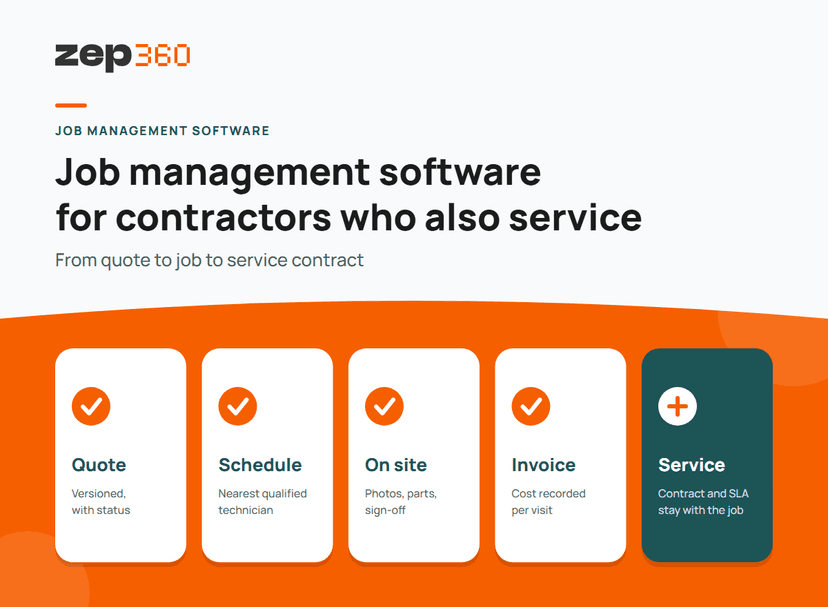
A job passes through six stages. Here is what ZEP360 handles at each one:
- Quote: ZEP Sales creates and revises quotations with status tracking and version history, and shows each deal's stage on a pipeline board.
- Schedule and dispatch: the dispatch hub shows who is free and where each technician needs to be. Route planning sends the job to the nearest qualified technician, based on skill and location.
- On site: technicians work offline and the data syncs when signal returns. They capture photos, spare parts used and compliance sign-off, and they see the service history from past visits.
- Cost: labour, spares and travel are tracked per visit. For larger projects, ZEP Projects tracks actual spend against the baseline budget by category.
- Paperwork: reports and certificates generate automatically for the contractor.
- Service: contracts, renewal dates and SLAs live in the same system as the job. Preventive maintenance schedules and reminders run automatically.
Features that matter

Use this table when you compare tools. The right column lists what to ask each vendor.
| Area | What to check |
| Quoting | Can you revise a quote, track its status and turn it into a job without retyping? |
| Scheduling and dispatch | Does one screen show availability, skills and location? |
| Mobile app | Does it work offline? Can technicians add photos, signatures and parts used? |
| Job costing | Does it record labour, materials and travel against each job? |
| Accounting | Which accounting tools sync, and do costs sync as well as invoices? |
| Equipment history | Is the record attached to the unit, or only to the customer? |
| Service agreements | Does it track renewals, SLA timers and preventive schedules? |
| Reporting | Can you see margin per job and per customer? |
Job management software compared with other tools
Four tool types overlap. Each answers a different question, so match the question to your business.
 Small-trade job apps cover quote, schedule and invoice for small crews. Ask whether they track renewal dates and SLA timers.
- Field service management adds contracts, SLAs, preventive maintenance and equipment history.
- A CMMS plans maintenance for equipment you own.
- ERP software covers finance, inventory and procurement across the business. Job tools sit alongside it.
If you install equipment and then service it, start with field service management. It includes the job features above.
How to choose job management software
Ask every vendor these questions. Write the answers down so you can compare them later.
- Does the job record link to the unit that was serviced?
- Can I see renewal dates and SLA timers in the same system?
- What works offline, and what waits for signal?
- Which accounting tools sync, and does job cost sync as well as the invoice?
- How does the price change when I add technicians or jobs?
- Who sets up the system, and how long does it take?
- Can I export my data if I leave?
How to run a 30-day trial
A trial works when it tests real work. Pick one contract type, one team and five jobs. Then follow this schedule:
- Week 1: load one team's customers, sites and equipment.
- Week 2: run five jobs from quote to completion, including at least one on a site with poor signal.
- Week 3: compare the records. Count missing photos, missing parts and jobs with no cost.
- Week 4: check renewals. Can you see every contract due in the next 60 days?
Write down the same four numbers before and after: minutes from quote to scheduled job, admin minutes per job, share of jobs with a complete cost record, and renewals visible 60 days ahead.
Frequently asked questions
What is job management software?
Job management software gives every paid job one record, from quote to invoice. It holds the customer, site, schedule, technician, time, parts, photos, costs and billing, so the office and the field see the same information.
How is job management software different from field service management software?
Job management software tracks each job. Field service management software adds what happens after the job: service contracts, renewals, SLA timers, preventive maintenance and equipment history. Contractors who service what they install usually need both in one system.
How much does job management software cost in Australia?
Published starting prices on 22 October 2026 ranged from AUD 29 a month for ServiceM8 Starter to AUD 80 per user a month for AroFlo, with Tradify from USD 47 and Fergus from 53 per user a month (currency not shown on Fergus's site). Tools price by user or by job volume, so cost depends on your headcount and workload.
Does job management software work offline?
It depends on the vendor, so ask for a test on a site with no signal. ZEP360 works offline and syncs data when the signal returns.
Can job management software manage service contracts and renewals?
Some can, many focus on single jobs. Check for renewal dates per unit, SLA timers and contract signing. ZEP360 covers contract drafting, approval and e-signature, AMC renewals tracked per unit, and SLA escalation before a breach.


