
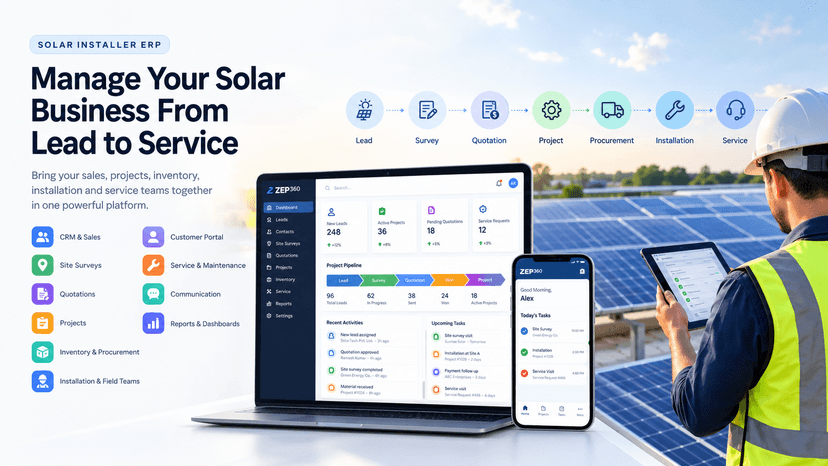
Solar Installer ERP: Manage Your Solar Business From Lead to Service
Manage sales, site surveys, quotations, projects, inventory, installation, customer communication, and after-sales service with a centralized solar installer ERP.
 Ankita
Running a solar installation business involves much more than installing solar panels. Teams need to manage leads, site surveys, quotations, customer follow-ups, projects, procurement, inventory, installation teams, payments, and after-sales service.
When these processes are managed through spreadsheets, emails, WhatsApp, and multiple disconnected applications, it becomes difficult to maintain visibility and control.
A solar installer ERP brings these processes together in one centralized platform, helping solar installers and EPC companies manage their complete business lifecycle.
What Is a Solar Installer ERP?
A solar installer ERP is a business management platform designed to manage the specific operational requirements of solar installation and EPC companies.
It connects different business processes, allowing information to flow from one stage to another.
A typical solar installation workflow can be managed through:
Lead → Site Survey → Quotation → Follow-Up → Deal Won → Project → Procurement → Installation → Commissioning → Service
Instead of entering the same information multiple times, teams can continue working with the information already captured in the system.
Why Do Solar Installers Need an ERP?
As a solar business grows, managing operations manually becomes increasingly difficult.
Common challenges include:
- Leads getting missed or followed up late
- Customer information being scattered across different platforms
- Delays in preparing quotations
- Lack of visibility into project progress
- Difficulty tracking materials and inventory
- Poor coordination between office and field teams
- Manual project status updates
- Difficulty managing service requests after installation
- Limited visibility into sales and operational performance
A centralized ERP helps solve these challenges by connecting the different parts of the business.
Key Features of a Solar Installer ERP
1. Lead and Sales Management
Capture leads from different sources and manage them through a centralized sales pipeline.
Sales teams can track:
- New leads
- Lead sources
- Sales representatives
- Follow-ups
- Site survey requirements
- Quotations
- Negotiations
- Won and lost opportunities
A structured sales pipeline gives managers better visibility into the sales process and helps teams ensure that opportunities do not get missed.
2. Site Survey Management
Site surveys are an important part of the solar sales and installation process.
Field engineers can capture information such as:
- Site details
- Roof information
- Electrical details
- Measurements
- Shading information
- Customer requirements
- Images and videos
- Survey documents
With mobile access, field teams can collect information directly from the site and make it available to the sales and project teams.
3. Quotation and Proposal Management
Once the survey is completed, teams can prepare quotations based on the customer's requirements.
The system can manage:
- Solar system capacity
- Panels
- Inverters
- Batteries
- Mounting structures
- Cables and accessories
- Installation charges
- Discounts
- Taxes
- Payment terms
A solar ERP can also help generate standardized quotation and proposal documents, reducing manual calculations and improving consistency.
4. Project Management
Once a customer accepts the quotation, the opportunity can be converted into a project.
Project teams can manage:
- Project stages
- Tasks
- Milestones
- Checklists
- Project documents
- Installation activities
- Expenses
- Payments
- Project progress
Project managers can get a centralized view of active installations and identify delayed or pending activities.
5. Procurement and Inventory Management
Solar installation requires the availability of different materials and components.
An ERP can connect project requirements with procurement and inventory.
Typical procurement processes include:
Material Requirement → Purchase Request → RFQ → Vendor Quotation → Purchase Order → Goods Receipt → Stock
Inventory can be tracked across warehouses, branches, site stores, vehicles, and other storage locations.
This helps teams understand what materials are available, what has been allocated to a project, and what needs to be purchased.
6. Installation and Field Team Management
Solar installation teams spend a significant amount of time in the field.
A mobile-friendly ERP allows engineers and technicians to access:
- Assigned projects
- Customer information
- Site details
- Installation tasks
- Checklists
- Required materials
- Documents
- Previous activity
- Images and notes
Field teams can update task progress from the site, giving project managers better visibility into actual installation progress.
7. Customer Management
A centralized customer record can contain the customer's complete business history.
Teams can access:
- Customer details
- Leads
- Quotations
- Projects
- Documents
- Payments
- Communication
- Installed assets
- Service history
This creates a single source of information for customer-facing teams.
8. Service and Maintenance Management
The relationship with a customer continues after the solar system is installed.
Customers may require:
- Preventive maintenance
- Breakdown support
- Warranty service
- Inspections
- Repairs
- Spare parts
- AMC services
A solar ERP can manage the complete service lifecycle:
Service Request → Assignment → Diagnosis → Repair → Customer Confirmation → Closure
Installed equipment can also be maintained as assets, allowing service teams to view the equipment details and previous service history.
9. Communication and Notifications
Solar companies communicate with customers and internal teams through multiple channels.
An ERP can centralize communication through channels such as:
- SMS
- Phone
- In-app notifications
Automated notifications can be triggered for events such as:
- Site survey scheduled
- Quotation generated
- Follow-up required
- Payment due
- Installation scheduled
- Installation completed
- Service visit scheduled
This reduces manual communication and keeps customers informed throughout the process.
10. Dashboards and Reporting
Management needs visibility across both sales and operations.
A solar ERP can provide dashboards for:
Sales
- Leads
- Conversion rate
- Quotation value
- Won and lost deals
- Sales representative performance
Projects
- Active projects
- Project progress
- Delayed projects
- Projects by stage
- Upcoming activities
Inventory
- Current stock
- Low-stock items
- Material consumption
- Project-wise material usage
Service
- Open service requests
- Technician workload
- Response time
- Resolution time
- Pending service jobs
These insights help management identify bottlenecks and make better business decisions.
The Complete Solar Installer ERP Workflow
A connected solar ERP can bring the complete business lifecycle into one workflow:
Lead
↓
Site Survey
↓
Quotation
↓
Follow-Up
↓
Deal Won
↓
Project Creation
↓
Procurement
↓
Inventory Allocation
↓
Installation
↓
Inspection & Commissioning
↓
Customer Handover
↓
Asset Registration
↓
Service & Maintenance
This connected approach reduces duplicate data entry and gives every team access to the information they need.
Benefits of Using a Solar Installer ERP
A purpose-built solar ERP can help businesses:
- Centralize business information
- Reduce manual work
- Improve sales follow-ups
- Track projects more effectively
- Improve inventory visibility
- Coordinate field teams
- Standardize business processes
- Improve customer communication
- Manage post-installation service
- Monitor business performance
- Scale operations more efficiently
What Should You Look for in a Solar ERP?
Before selecting an ERP, solar installers should evaluate whether the platform can support their complete business process.
Important capabilities include:
- Solar-specific sales workflows
- Site survey management
- Quotation management
- Project management
- Procurement and inventory
- Mobile field operations
- Customer management
- Service management
- Workflow automation
- Document management
- Communication
- Reporting and dashboards
- Configurable business processes
- Multi-user and multi-location support
The most important factor is not the number of modules available. It is how effectively those modules work together.
Build a Connected Solar Business With ERP
Solar installation companies need more than individual tools for CRM, project management, inventory, or service.
They need a connected system that can manage the complete customer and operational journey.
A solar installer ERP provides that connection—from the first lead and site survey to quotation, installation, customer handover, and long-term service.
By bringing sales, projects, procurement, inventory, field teams, customers, and service into one platform, solar businesses can improve visibility, reduce operational complexity, and build a scalable foundation for growth.
A modern solar ERP is not just software for managing installations. It is a centralized operating system for the entire solar business.
Suggested CTA:
Explore how a connected ERP can simplify your solar installation operations.


